

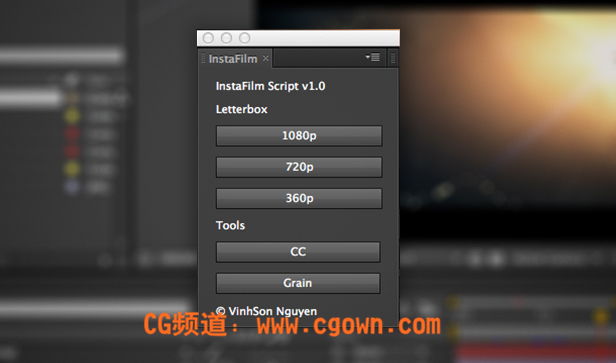
InstaFilm creates a quick letterboxing layer using a black solid and a mask. Simply choose your composition size and it’ll draw the right letterbox for your comp size. This beats manually drawing one each time that may be uneven or copying/pasting it. Pressing the ‘CC’ button will create a new Adjustment Layer and apply: Magic Bullet Looks, Curves, Levels, and Tint. These are the 4 most common effects I use to color correct and color grade my shots. Lastly, gradient color banding is an issue, so a quick button for adding a subtle Grain effect does great wonders. It smoothes out color banding and makes your motion graphics look a bit less digital and sharp.
It’s important to note that this script was built entirely on my needs, so don’t be surprised if it isn’t really useful to you. I will be adding more features and hopefully more advanced options in the future, but this is it for version 1.0 until I learn more scripting. So many of you guys were interested in it and wanted me to release it after trying the beta, so here it is:
Download InstaFilm Script v1.0
本站文章未经许可,禁止转载!
如果文章内容介绍中无特别注明,本网站压缩包解压需要密码统一是:www.cgown.com
本站资源由互联网搜集整理而成,版权均归原作者所有,仅供观摩学习,不保证资源的可用及完整性,不提供安装使用及技术服务。
若无意中侵犯到您的版权利益,请来信联系我们,我们会在收到信息后会尽快给予处理!版权说明点此了解!





0 条评论